
TL;DR:
- Mobile app marketers can significantly reduce ad production costs by auditing expenses and replacing costly freelancers with AI-powered tools. Creating simplified, lo-fi playable ads that focus on a single mechanic and short engagement loops boosts performance without high production costs. Embracing imperfection, automation, and systematic testing enables scalable, budget-friendly user acquisition strategies that outperform traditional polished creative approaches.
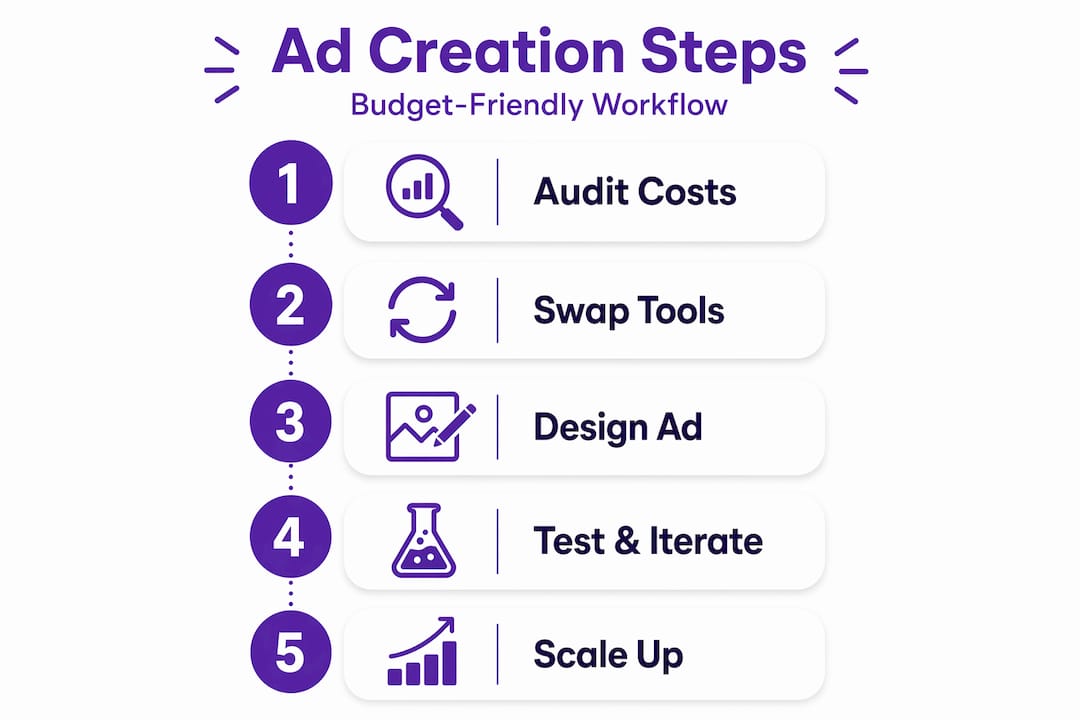
Mobile app marketers know the frustration well: playable ads drive some of the highest conversion rates in user acquisition, yet traditional production routes eat through budgets fast. Designer fees, freelancer retainers, and stock asset subscriptions stack up before a single ad goes live. The good news is that following structured, budget-friendly ad creation steps can bring production costs down significantly without sacrificing the quality that moves installs. This guide walks you through auditing your spending, adopting AI tools, designing for engagement on a budget, meeting technical compliance requirements, and building a testing system that compounds returns over time.
Table of Contents
- Understanding and auditing your current ad production costs
- Replacing expensive dependencies with AI-powered tools
- Designing playable ads that engage without high production costs
- Optimising playable ad technical performance and compliance
- Testing, iterating, and scaling your budget-friendly playable ads
- Why embracing imperfection and automation is the key to budget-friendly ad success
- Streamline your playable ad creation with PlayableMaker’s tools
- Frequently asked questions
Key Takeaways
| Point | Details |
|---|---|
| Audit true costs | Start by precisely calculating your current ad production expenses to identify waste and set a baseline for improvements. |
| Use AI tools | Replace costly freelancers and stock subscriptions with AI ad creation platforms to cut production costs by up to 60%. |
| Embrace simple playable design | Design playable ads with short, intuitive loops and consider scrappy creative to boost engagement affordably. |
| Optimize for speed and compliance | Ensure ads meet technical platform requirements for fast loading and smooth interaction to avoid costly rejections. |
| Test and iterate efficiently | Leverage split-testing and bulk AI creative generation to continuously improve campaign performance within budget. |
Understanding and auditing your current ad production costs
To reduce costs effectively, start by gaining a clear picture of your current spending habits. Most mobile marketers are surprised to discover how much of their ad budget disappears into recurring costs that deliver little measurable value.
The budget-friendly ad creation process begins with a full audit. Document every expense that touches ad production: designer day rates, freelance animator fees, stock image and video subscriptions, music licensing costs, and any third-party platforms used for creative editing or rendering. Pull invoices from the last three to six months and categorise each line item.
- List all recurring subscriptions tied to ad production and note which ones were used in the last 90 days.
- Calculate your average cost per unique creative. Divide total monthly production spend by the number of distinct ad variations you shipped. Many teams producing five to ten ads per month are spending well over £500 per creative without realising it.
- Identify idle expenditure. Stock libraries, premium plugins, and unused software licences are common culprits. Research shows that auditing creative production costs regularly reveals 30 to 50% unnecessary expenses in the average marketing team’s budget.
- Flag freelancer dependency. If a single designer or animator is responsible for most of your output, that individual represents both a cost bottleneck and a production risk.
“Understanding your true cost per creative is not a bookkeeping exercise. It is the baseline that makes every other saving measurable and meaningful.”
Once you have the numbers, compare them against benchmarks. A well-run marketing budget set for ROI should allocate creative production costs proportionate to expected returns, not historical habit. If your cost per creative is disproportionately high relative to your click-through or install rates, that is your first priority to address.
Pro Tip: Create a simple spreadsheet that tracks cost per creative alongside CTR and install rate for every ad you run. Within two months, you will see clearly which spending is returning value and which is purely overhead.
For a deeper look at how to structure cost-efficient creative output, the budget-friendly playable ads guide covers production frameworks specifically built for mobile app marketers.
Replacing expensive dependencies with AI-powered tools
After auditing costs, the next critical step is to eliminate or replace costly traditional production dependencies. This is where the largest gains in affordable ad design typically materialise.
Freelance designers and animators are the highest single cost for most mobile marketing teams producing playable ads. A professional freelancer building one playable ad from scratch can charge anywhere from £800 to £3,000 depending on complexity. AI-powered tools can now handle many of the same tasks at a fraction of that figure.
- AI image and video generation platforms produce usable creative assets in minutes. Tools such as RunwayML or Adobe Firefly generate background art, character variations, and UI elements without requiring design expertise.
- UGC-style ad generators create authentic-looking user content ads at scale. These are particularly effective for casual mobile games where social proof drives instals.
- Online ad builders like CapCut’s free ad maker allow you to produce polished ads using templates and AI tools, exporting at no cost. For campaigns under £120 in creative budget, this is a practical starting point.
- No-code playable ad tools remove the need for a developer entirely. Platforms purpose-built for no-code playable ad creation let marketers drag, drop, and publish HTML5 playable ads without writing a line of code.
Replacing expensive freelancer dependencies with AI tools delivers 40 to 60% cost savings immediately, and those savings can fund something more valuable: a reusable asset library. When you own a bank of backgrounds, character sprites, UI elements, and sound effects, every future ad costs less to produce because the foundational work is already done.
Pro Tip: Before subscribing to any AI tool, run a two-week trial using free tiers only. Produce three to five test creatives. If the quality clears your internal bar, then commit to a paid plan.

For marketers ready to explore AI-driven production further, AI-powered playable ad creation tools can generate complete playable experiences based on basic inputs about your app’s core mechanic.
Designing playable ads that engage without high production costs
With efficient tools in place, the focus shifts to crafting playable ads that deliver strong engagement on a budget. The design choices you make here directly affect both production cost and campaign performance.
The most common mistake in playable ad design is overcomplication. More interactions, more animations, and more text do not produce better results. They produce longer build times and higher bounce rates. Effective playable ads are simplified, gamified loops of the app’s core value proposition, completable in under 15 seconds.
Core design principles for budget-friendly playable ads:
- One mechanic only. Choose the single interaction that best represents your app’s appeal: swipe, tap, drag, or tilt. Build the entire playable around that one action.
- No text instructions. If users need written guidance to understand what to do, the mechanic is too complex. Intuitive design costs less to produce and converts better.
- Short loops. Keep the full playable experience under 15 seconds. This reduces asset complexity and keeps production time low.
- Keep UI away from screen edges. Safe zone compliance matters across devices. Elements placed too close to edges risk being cut off on some screens, requiring costly revisions.
One counter-intuitive but well-evidenced approach is the deliberate use of lo-fi or “ugly” creative. Rather than investing in polished animation, rough-looking ads outperform polished creative on Meta and TikTok by breaking feed patterns and reducing the skip reflex viewers develop for visually perfect content.
| Ad approach | Production cost | Skip rate impact | Best platform fit |
|---|---|---|---|
| High-polish animated | High | Higher skip rate | YouTube pre-roll |
| Lo-fi “ugly” creative | Low | Lower skip rate | TikTok, Meta feed |
| Template-based AI ad | Very low | Moderate | Meta, Google UAC |
| Playable mini-game | Medium (no-code) | Lowest | Meta, Google |
Pro Tip: Test your lead-in hook video separately from the playable mechanic itself. A weak hook kills CTR before the interaction even loads. Run two or three hook variants against each other first, then iterate on the playable once you have a winning hook.
The playable ad design process goes deeper on structuring these components for maximum efficiency and creative impact.
Optimising playable ad technical performance and compliance
Technical optimisation is crucial to ensure your engaging ad creative performs well under platform constraints. A beautifully designed playable ad that loads slowly or fails compliance checks costs you in wasted spend and lost instals.
Follow these technical steps in order:
- Keep total file size under 2MB. Meta’s strict 2MB limit applies to a single HTML5 index file with all assets embedded as Base64 strings. Exceeding this limit means your ad will not serve.
- Use PNG8 or WebP for images. Both formats deliver smaller file sizes without visible quality loss compared to standard PNG or JPEG at equivalent dimensions.
- Apply texture atlasing. Combining multiple small images into a single sprite sheet reduces HTTP requests and speeds up load time considerably.
- Mute audio by default. Platforms require audio to be off until the user actively interacts. Autoplay sound triggers compliance rejection and irritates users.
- Test first-interaction response time. The first tap or swipe must register within 0.5 seconds. Ads that load slowly and respond late lose 20 to 30% of engagement per extra second of delay.
| Technical requirement | Target value | Consequence of failure |
|---|---|---|
| Total file size | Under 2MB | Ad rejected by Meta |
| Load time | Under 2 seconds | 20-30% engagement drop |
| First interaction response | Under 0.5 seconds | High bounce rate |
| Audio default state | Muted | Platform compliance rejection |
| Asset format | PNG8 or WebP | Oversized files, slow load |
Pro Tip: Run your completed playable through Meta’s Playable Preview tool before uploading. It surfaces safe zone issues, audio compliance failures, and file size problems before your ad enters the review queue.
Testing, iterating, and scaling your budget-friendly playable ads
Finally, implementing a structured testing and scaling approach ensures your low-cost playable ads deliver maximum impact. Producing affordable ads is only half of the equation. Knowing which ones to scale and which to cut is what actually drives ROI.
- Isolate variables in split-tests. Test one element at a time: the hook video, the gameplay difficulty curve, or the CTA card. Testing each component independently gives you clear data on what is driving or damaging performance.
- Set measurable targets before launch. Define your acceptable CTR threshold, CVR floor, and cost-per-install ceiling. Without these benchmarks, you cannot make confident budget allocation decisions.
- Generate bulk variations with AI. Once you have a winning structure, use AI tools to produce five to ten variations quickly with different visuals, colour schemes, or copy. This expands your testing pool without adding production cost.
- Run a continuous learning log. Document what worked, what failed, and why for every test cycle. This institutional knowledge prevents your team from repeating expensive mistakes.
- Shift spend rapidly. When a creative variant demonstrates clear performance superiority within three to five days of data, move budget toward it and pause underperformers immediately.
Key metrics to track across all budget ad tests:
- Click-through rate (CTR): Measures hook and creative appeal.
- Conversion rate (CVR): Reflects quality of the playable mechanic and CTA.
- Cost per install (CPI): The ultimate efficiency metric for mobile user acquisition.
- Day 1 and Day 7 retention: Signals whether the playable ad attracted genuinely interested users.
Pro Tip: Create a template brief for every new ad variation that records the hypothesis you are testing, the audience segment, and the expected outcome. This makes post-test analysis far faster and more consistent.
For a detailed framework on this approach, the guide on scaling budget-friendly playable ads covers how to move from single-test thinking to a systematic creative programme.
Why embracing imperfection and automation is the key to budget-friendly ad success
There is a belief, persistent in mobile marketing circles, that high-quality production is synonymous with high cost. That belief is becoming increasingly expensive to maintain. The evidence points in a different direction.
Lo-fi “ugly” ads break feed patterns by looking unlike the polished sponsored content users have trained themselves to dismiss. On TikTok and Meta in particular, this translates to measurably lower skip rates and higher engagement. The user’s brain registers something unfamiliar, and attention follows. Perfectly produced ads, by contrast, are categorised and scrolled past in milliseconds.
This does not mean abandoning quality entirely. The most effective low-cost advertising strategies maintain a core library of clean, well-crafted assets while running a parallel stream of intentionally rough, experimental creative. The polished library protects brand perception. The experimental stream finds unexpected winners.
Automation is the other half of this equation. AI tools now handle tasks that previously required a designer, a developer, and a project manager to co-ordinate. AI-powered iteration accelerates the creative learning cycle by removing the frustration of single-prompt failures, allowing marketers to generate, test, and learn from multiple variants simultaneously. This is not about replacing creative thinking. It is about removing the bottlenecks that slow creative thinking down.
The marketers who adopt this mindset early, accepting that imperfection has strategic value and that automation is a creative ally, will compound their advantages over time. Their cost per insight falls. Their iteration speed rises. Their ROI improves. This combination of AI in creative ideation and deliberate lo-fi testing is, in our view, the most underused approach available to mobile app marketers today.
Streamline your playable ad creation with PlayableMaker’s tools
To implement these budget-friendly ad creation techniques efficiently, consider leveraging a platform purpose-built for the challenge. PlayableMaker offers no-code drag-and-drop tools that allow marketers to build, preview, and publish HTML5 playable ads without involving developers. The platform integrates AI-powered ad generation, reusable asset libraries, and compliance checking tools for Meta and Google in a single workflow. If you are new to playable ads and their potential for user acquisition, the platform makes the format accessible from day one. Transparent pricing plans support teams at every scale, from solo marketers running lean budgets to larger teams needing bulk creative output at consistent quality.
Frequently asked questions
What are the first steps to reduce ad creation costs?
Begin by auditing all ad production expenses line by line, as auditing creative spend typically exposes 30 to 50% in unnecessary costs from idle subscriptions, unused tools, and over-reliance on expensive freelancers.
How can AI tools help make playable ads more affordable?
AI creative tools replace the need for costly freelancers and speed up asset production substantially, with research showing AI replacing freelancer dependency delivers 40 to 60% immediate cost savings that can be reinvested into reusable asset libraries.
What makes “ugly ads” effective on platforms like Meta and TikTok?
Lo-fi or deliberately unpolished ads avoid the visual patterns users associate with paid content, meaning ugly ads reduce the skip reflex and capture attention that more polished creative often loses on fast-scroll feeds.
What are key technical requirements for playable ads on Meta?
Playable ads must be a single HTML5 file under 2MB with all assets embedded as Base64 strings, must load within 2 seconds with first interaction responding in under 0.5 seconds, and must have audio muted by default.
How can marketers test and improve playable ads cost-effectively?
Split-test each component independently, including the hook video, gameplay difficulty, and CTA, then use AI to generate bulk variants of your best performer and iterate rapidly based on CTR, CVR, and cost-per-install data.
Recommended
- How to Repurpose Ad Creatives for Mobile Gaming Success – playablemaker.com How to Repurpose Ad Creatives for Mobile Gaming Success
- Create engaging playable ads on a budget: Step-by-step guide – playablemaker.com Create engaging playable ads on a budget: Step-by-step guide
- High-impact mobile ad creatives: list, tips & tools – playablemaker.com High-impact mobile ad creatives: list, tips & tools
- Master the Dynamic Ad Creative Process for Mobile Gaming – playablemaker.com Master the Dynamic Ad Creative Process for Mobile Gaming