
TL;DR:
- Structured workflows and no-code tools enable faster, more cost-effective ad creative production.
- Regular creative iteration reduces fatigue and improves campaign performance over time.
- Playables outperform videos with higher conversions and retention, especially for simple game genres.
Ad campaign mismanagement quietly drains budgets and demoralises teams. Creative fatigue sets in faster than most UA managers expect, and without a structured workflow, even well-funded campaigns underperform. The good news is that the problem is largely structural, not strategic. By putting the right preparation, creative processes, and iteration habits in place, user acquisition managers and creative directors can run leaner, faster, and more profitable campaigns. This guide walks through each stage of an efficient ad campaign management workflow, from setting objectives to post-launch optimisation, with practical steps designed for mobile gaming teams who need results without excessive overhead.
Table of Contents
- Laying the groundwork: objectives, audience, and resources
- Building efficient creative workflows: leveraging no-code tools
- Executing campaigns: channel selection, budget allocation, and launch
- Optimisation, iteration, and troubleshooting for continued performance
- Why most campaign workflows overlook creative iteration—and how to fix it
- Unlock your next level of campaign efficiency
- Frequently asked questions
Key Takeaways
| Point | Details |
|---|---|
| Start with clear objectives | Defining campaign goals and KPIs at the outset ensures focused execution and easier optimisation. |
| Adopt no-code creative tools | No-code platforms let your team quickly build, test, and iterate playable ads without developer backlog. |
| Iterate for lasting results | Consistent creative refreshes and performance optimisation prevent ad fatigue and continually boost ROI. |
| Match format to genre | Choosing the right ad type for your game’s genre and audience improves engagement and conversion. |
Laying the groundwork: objectives, audience, and resources
Every high-performing campaign starts well before the first creative is built. The preparatory phase determines whether your budget works for you or against you. Skipping it is one of the most common and costly mistakes in mobile game marketing.
Start by setting SMART objectives for every campaign. Specific, Measurable, Achievable, Relevant, and Time-bound goals give your team a shared definition of success. Pair each objective with clearly defined KPIs such as cost per install (CPI), return on ad spend (ROAS), Day 1 retention, and install-per-mille (IPM). These metrics will anchor every creative and bidding decision you make.
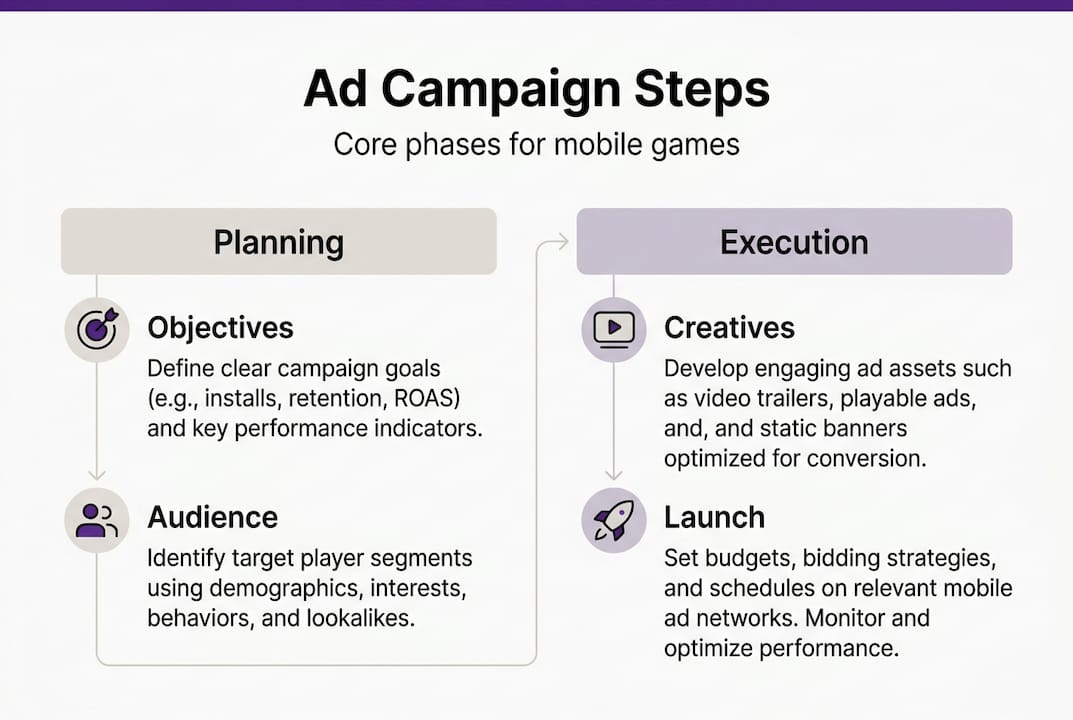
Audience segmentation comes next. Broad targeting wastes spend. Instead, define player personas based on genre affinity, device type, geography, and behavioural signals from your existing player base. The more precise your segmentation, the more relevant your creatives can be, and relevance is what drives both click-through rate and post-install quality.
With goals and audience defined, assemble your resources. This means your creative asset library, campaign budget split across channels, and your management toolset. Understanding the playable ad benefits at this stage helps you allocate budget to formats that genuinely move the needle.
A useful reference framework is the UA campaign checklist: define SMART objectives and KPIs, segment your audience, choose ad formats and channels, create interactive creatives including playables, set up tracking, optimise budget and bidding, then review and iterate. This seven-step sequence keeps both UA and creative production sides aligned throughout the campaign lifecycle.
Pre-launch preparation checklist:
- Define campaign objective and primary KPI
- Build audience segments with targeting parameters
- Select ad formats suited to your game genre
- Confirm creative asset availability and production timeline
- Set up attribution and analytics tracking
- Allocate budget across channels with contingency reserve
- Brief creative team on messaging and tone
| Preparation element | Why it matters | Common mistake |
|---|---|---|
| SMART objectives | Aligns team and budget | Vague goals like “grow installs” |
| Audience segmentation | Improves relevance and ROAS | Targeting too broadly |
| Attribution setup | Enables accurate optimisation | Tracking gaps post-launch |
| Creative briefing | Reduces revision cycles | Briefing too late in process |
Pro Tip: If you are new to playable formats, the introduction to playable ads is worth reviewing before finalising your format mix. Understanding what makes them effective shapes better creative briefs from the outset.
Building efficient creative workflows: leveraging no-code tools
Once foundational goals are set and resources are in place, the next step is designing an agile, scalable creative process. The traditional approach to playable ad production involves developers, lengthy QA cycles, and significant cost. That model is increasingly hard to justify when campaign performance demands weekly creative refreshes.
A structured creation workflow looks like this:
- Define the core interaction based on your game mechanic and campaign objective
- Select interactive elements that reflect the player experience authentically
- Assemble the ad using a no-code platform with pre-built templates
- Optimise for engagement by testing call-to-action placement and end card messaging
- Analyse performance against IPM and D1 retention benchmarks before scaling
This process, drawn from the guide to high-performing game ads, reduces the time from concept to live ad significantly. No-code tools enable rapid playable creation without developer involvement, and weekly creative refreshes combat ad fatigue in a cost-effective way.
The contrast between manual and no-code production is stark:
| Production method | Time to launch | Estimated cost | Iteration speed |
|---|---|---|---|
| Manual (dev-led) | 2 to 4 weeks | High | Slow, approval-heavy |
| No-code platform | 2 to 5 days | Low to moderate | Fast, team-driven |
The speed advantage compounds over time. A team producing one new creative per month struggles to respond to performance data. A team using no-code tools and refreshing creatives weekly can test more hypotheses, identify winning variants faster, and suppress fatigue before it erodes campaign efficiency.
No-code workflows also change the collaboration dynamic. UA managers can brief creative directors directly, and creative directors can produce and iterate without waiting for developer availability. This is particularly relevant given the no-code ad trends reshaping production pipelines across the industry.

Pro Tip: Explore the power of playable templates to understand how pre-built structures can dramatically cut production time while maintaining creative quality and brand consistency.
Executing campaigns: channel selection, budget allocation, and launch
With a streamlined creative process in place, success hinges on smart execution. Choosing the right channel and format combination is not a one-size-fits-all decision. It depends on your game genre, campaign objective, and the behaviour of your target audience.
Playable ad engagement performs differently across game types. Playables deliver the highest CTR and IPM for hypercasual and simple-mechanic games, where the core loop can be communicated in seconds. For RPGs and midcore titles that require narrative context, playables are less effective on their own. In those cases, a hybrid video-plus-playable format tends to perform better, giving players context before the interactive moment.
Rewarded user acquisition is another format worth evaluating. It consistently produces strong Day 1 retention rates, often in the 40 to 50% range, but the key metric to assess is lifetime value (LTV), not just CPI. High-volume, low-LTV installs from rewarded placements can distort ROAS projections if not monitored carefully.
On the empirical side, playables yield 30% higher conversions and 25% better retention compared to standard video formats. These figures inform how you weight your budget allocation across formats.
For budget distribution, diversification reduces risk. Concentrating spend on a single channel creates vulnerability to algorithm changes, policy shifts, or audience saturation. Spread across two or three channels, with performance-based reallocation built into your weekly review cycle.
“Forecast your D365 ROAS from D7 data with a 4 to 5% margin of error. This gives you an early signal on campaign viability without waiting months for full return data.”
Pre-launch QA checklist:
- Creative assets reviewed and approved across all formats
- Tracking links tested and verified in attribution platform
- Initial bids set conservatively with headroom to scale
- Channel-specific creative specifications confirmed
- Audience segments double-checked against targeting parameters
Review the full range of ad format options available to ensure your launch mix is genuinely suited to your game and audience, not just the formats you have used before.
Optimisation, iteration, and troubleshooting for continued performance
Campaign launch is only the beginning. Ongoing iteration is what drives lasting results and separates teams that plateau from those that compound their gains over time.
Monitor these KPIs daily in the first week post-launch:
- CPI to assess acquisition efficiency against targets
- ROAS at D7 as an early proxy for long-term return
- Day 1 retention to gauge install quality from each creative
- IPM to identify which creatives are resonating at impression level
- Creative engagement rate to spot fatigue before it affects spend efficiency
When performance drops, the cause is usually one of three things: creative fatigue, audience saturation, or a platform-side issue such as algorithm changes or increased competition in your bidding pool. Diagnosing the cause matters because the fix is different in each case.
For creative fatigue, the solution is a fresh variant, not a full rebuild. Changing the opening three seconds, the call-to-action wording, or the colour scheme of the end card can restore performance quickly. This is where no-code workflows pay for themselves, as described in the no-code workflow benefits overview.
For audience saturation, expand your targeting parameters incrementally or introduce a lookalike audience based on your highest-LTV players. For platform issues, review your Facebook UA overview and equivalent channel documentation to understand whether policy or algorithm changes are affecting delivery.
The final step in the UA campaign checklist is to review and iterate systematically. Build a weekly rhythm: pull performance data, identify the lowest-performing creative, replace it, and test a new hypothesis. This cadence, maintained consistently, produces compounding improvements over a campaign’s lifetime.
Common performance issues and fixes:
- Falling IPM: Refresh the opening hook of your playable
- Rising CPI with stable CTR: Review post-install funnel for onboarding issues
- Low D1 retention: Audit creative-to-game experience alignment
- Stagnant ROAS: Test new audience segments or channel mix
Pro Tip: Run rapid A/B tests with a single variable changed per variant. Multi-variable tests are harder to interpret and slow down the learning cycle when budgets are limited.
Why most campaign workflows overlook creative iteration—and how to fix it
Most mobile gaming UA teams invest heavily in campaign setup and relatively little in the ongoing creative refresh cycle. This is a structural imbalance that consistently limits performance. The assumption is that a strong launch creative will carry the campaign. In practice, even excellent creatives fatigue within two to three weeks at meaningful spend levels.
The real competitive advantage lies not in producing one brilliant ad, but in building a system that produces good ads continuously and cheaply. Teams that treat creative iteration as a weekly operational habit, rather than a reactive fix, outperform those with rigid, approval-heavy production paths. The shift is partly logistical and partly cultural.
No-code workflows make this shift achievable. Moving from whiteboard to deployed creative in two to three days means your team can respond to performance data in near real-time. That responsiveness, compounded across weeks and months, is where cost-effective ad creation genuinely changes campaign economics. The teams winning in mobile UA right now are not necessarily the ones with the biggest budgets. They are the ones iterating fastest.
Unlock your next level of campaign efficiency
If this guide has clarified where your workflow needs attention, the next step is finding tools that match your pace. PlayableMaker is built specifically for UA managers and creative directors who need to produce, test, and refresh playable ads without draining development resources or campaign budgets. The drag-and-drop playable builder lets your team go from concept to live ad in days, not weeks, with no coding required. Whether you are managing a single title or a portfolio of games, PlayableMaker gives you the creative agility to iterate continuously and compete effectively across every major channel.
Frequently asked questions
What are the key steps in managing a successful ad campaign for mobile games?
The main steps are: define SMART objectives and KPIs, segment your target audience, choose appropriate ad formats, create interactive ads including playables, implement tracking, optimise budget and bidding, and review and iterate based on performance data.
How do no-code tools improve campaign management efficiency?
No-code platforms allow teams to build and refresh playable ads without developer involvement, cutting production time from weeks to days. Weekly creative refreshes combat ad fatigue cost-effectively and keep campaigns performing without large production overheads.
Are playables suitable for all mobile game genres?
Playables perform best for hypercasual and simple-mechanic games where the core loop is easy to demonstrate quickly. For RPGs and midcore titles, hybrid video-plus-playable formats tend to bridge the context gap more effectively.
What performance gains can playables deliver compared to video ads?
Playables deliver approximately 30% higher conversions and 25% better retention compared to standard video formats, making them a strong choice for campaigns where install quality matters as much as volume.
Recommended
- Mobile Game Ad Best Practices for Effective Campaigns – playablemaker.com Mobile Game Ad Best Practices for Effective Campaigns
- Master the Dynamic Ad Creative Process for Mobile Gaming – playablemaker.com Master the Dynamic Ad Creative Process for Mobile Gaming
- Master Effective Playable Ad Techniques for Mobile Gaming – playablemaker.com Master Effective Playable Ad Techniques for Mobile Gaming
- How to Repurpose Ad Creatives for Mobile Gaming Success – playablemaker.com How to Repurpose Ad Creatives for Mobile Gaming Success
- Mobile game influencer marketing: a step-by-step guide
- marketing campaign management software | Brainiac Media