
TL;DR:
- Effective mobile game ads require adherence to platform rules, streamlined no-code workflows, and a focus on meaningful metrics like retention and LTV. Building templates and building compliance checks upfront minimize revisions and maximize campaign efficiency. Prioritizing user quality over surface metrics ensures sustainable ROI and long-term growth.
Budget constraints and tight production schedules are a persistent reality for mobile game marketing teams. When playable and interactive ads demand developer time, specialist tooling, and multiple revision rounds, many UA campaigns stall before they reach their potential. This guide walks you through a practical, no-code workflow for creating high-performing interactive and playable ads, from initial requirements through to deployment and measurement. You will learn how to navigate platform compliance, avoid costly mistakes, and measure what genuinely matters for user acquisition performance.
Table of Contents
- What you need before you start: requirements and platform rules
- Step-by-step ad creative process for interactive game ads
- Common workflow mistakes and how to avoid them
- Measuring success: which metrics matter for playable ads?
- The uncomfortable truth about creative success in UA for games
- Level up your game ads with cost-effective, no-code solutions
- Frequently asked questions
Key Takeaways
| Point | Details |
|---|---|
| No coding required | Anyone can produce interactive game ad creatives without coding skills thanks to modern no-code tools. |
| Follow platform rules | Meeting Google and industry technical standards from the outset prevents ad disapproval and revision cycles. |
| Focus beyond CTR | Measuring creative success by true business value—not just clicks—leads to better long-term UA performance. |
| Avoid common errors | Use compliance checklists and previews to sidestep costly and frequent ad creative mistakes. |
| Iterate for real outcomes | Creative testing should target deeper metrics like LTV and installs, not just initial engagement signals. |
What you need before you start: requirements and platform rules
With the challenge clear, let us identify what you will need and get your ad creative process set up for success.
Before a single asset is assembled, you need a solid understanding of technical requirements and platform rules. Skipping this stage is one of the most expensive mistakes a UA team can make. Rejections, re-submissions, and delayed launches drain resources that should be flowing into live campaigns.
Technical constraints for HTML5 and playable ads
Google App campaigns require HTML5/Playable assets to meet specific technical constraints, including proper declaration, appropriate meta tags, no auto-playing sound before user interaction, and relative asset referencing. These standards directly affect measurement accuracy and campaign outcomes. Ignoring them means your ad may not serve, or worse, it may serve but track inaccurately.
Critical compliance note: Sound must never play before the user interacts with the ad. This is a hard platform rule, not a recommendation. Any violation will result in disapproval.
Alongside audio rules, overlay text and logos should be kept minimal, with overlaid content occupying less than 20% of the total image area. Excessive overlays obscure the gameplay preview and reduce the persuasive quality of the ad itself.
Assets and tools to prepare
Before you open any creative tool, assemble the following:
- Game graphics and sprites: Key characters, backgrounds, and UI elements exported at the correct resolution for mobile screens.
- Sound files (interaction-triggered only): Short, loopable audio that fires on user interaction, not on load.
- Copy and call-to-action text: Tested messaging aligned with your current UA goals, kept concise for small screen formats.
- Tracking and measurement tags: Any click-tracking URLs, impression pixels, or attribution partner tags that need embedding in the HTML5 wrapper.
- Brand assets: Logos and colour palettes conforming to your current brand guidelines.
For teams following mobile ad best practices, checking HTML5 ad asset compliance before creative work begins saves significant revision time later.
| Asset type | Required format | Key rule |
|---|---|---|
| Game graphics | PNG, SVG, WebP | Optimised file size, relative paths |
| Audio | MP3, OGG | Triggered by interaction only |
| CTA copy | Plain text | Under 30 characters for clarity |
| Tracking tags | JavaScript snippet | Embedded in HTML5 wrapper |
| Overlays (logos/text) | PNG with transparency | Below 20% of image area |
Pro Tip: Build a compliance checklist specific to each platform you target before any creative work begins. Running compliance checks retroactively, after designs are finalised, typically adds one to two full revision rounds. Doing it upfront eliminates that overhead entirely.
Step-by-step ad creative process for interactive game ads
With your assets and requirements organised, it is time to walk through the creative process itself, optimised for no-code speed and maximum engagement.

A structured process prevents the creative chaos that inflates production timelines. Each step below is designed to be repeatable across campaigns, reducing the learning curve for new team members and enabling faster iteration.
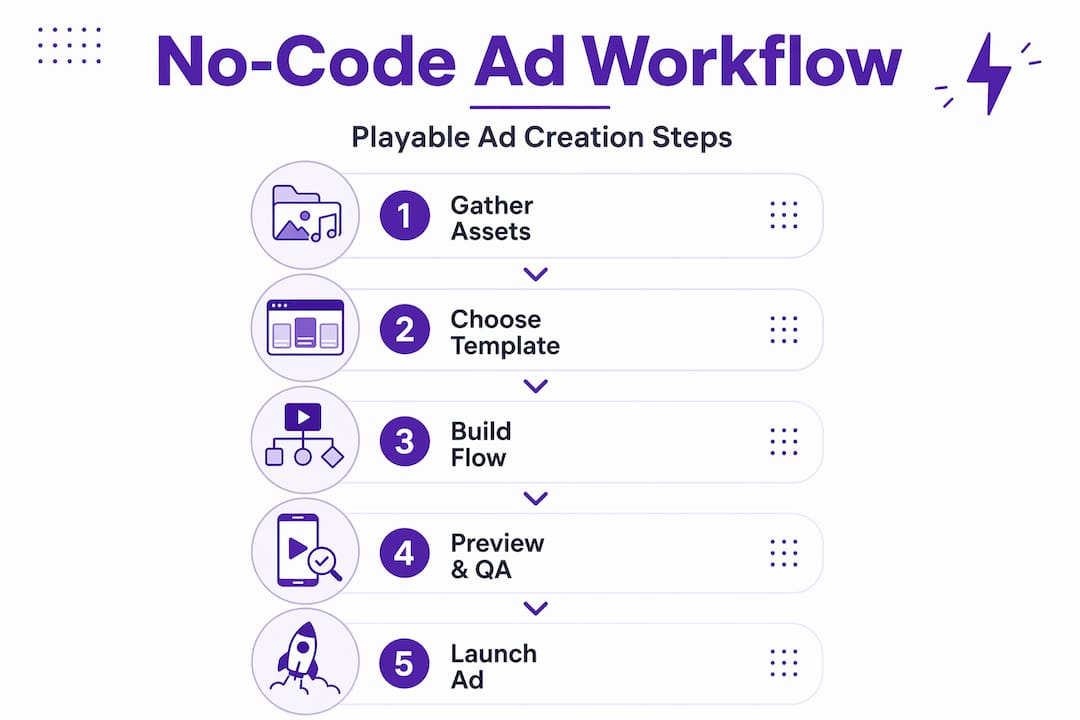
The seven-stage workflow
-
Define the playable mechanic. Choose a single, simple interaction that reflects your core gameplay loop. Swipe, tap, drag, or match mechanics work well for mobile. Complexity reduces completion rates, so keep it to one clear action. Review creative ad concepts for inspiration on mechanics that map well to specific genres.
-
Rapid prototype with a no-code builder. Select a no-code tool that supports HTML5 export and has pre-built interactive templates. Drag in your assets, configure the mechanic, and generate a working prototype within hours rather than days. Focus on the feel of the interaction at this stage, not visual polish.
-
Integrate your game assets. Swap placeholder graphics for your actual game sprites, characters, and backgrounds. Keep file sizes lean. A common benchmark is to target a total ad file size under 2MB for smooth delivery across networks.
-
Write and position your CTA. Effective CTAs use action verbs and create urgency without being misleading. “Play now” or “Try for free” consistently outperform generic “Download” text. Position the CTA so it appears naturally at the moment the user completes or nearly completes the playable interaction.
-
Run a compliance check. Return to your pre-built checklist. Confirm audio behaviour, overlay percentages, file structure, relative paths, and meta declarations. Playable ads must be packaged with a proper HTML5 structure to meet App campaign requirements, so this stage is non-negotiable.
-
QA and preview across devices. Test on at least three screen sizes and two operating systems. Rendering differences between Android and iOS are common and need to be identified before submission, not after.
-
Package and launch. Export your final HTML5 zip, upload to your campaign, and confirm all tracking parameters are firing correctly post-launch. Monitor the first 24 to 48 hours closely for any delivery or tracking anomalies.
| Workflow stage | No-code approach | Time estimate |
|---|---|---|
| Mechanic selection | Template library review | 1 to 2 hours |
| Prototype build | Drag-and-drop builder | 2 to 4 hours |
| Asset integration | File upload and swap | 1 to 3 hours |
| Compliance check | Checklist review | 30 to 60 minutes |
| QA and device testing | Preview tool or browser | 1 to 2 hours |
| Packaging and launch | HTML5 export and upload | 30 minutes |
For teams looking to improve the user experience within the ad itself, boosting ad UX through no-code tools is an area worth exploring in depth alongside this workflow.
Pro Tip: Build a library of reusable mechanic templates and asset modules. Once you have a validated tap or swipe mechanic, reusing it across multiple campaigns with different skins reduces per-ad production time by 40 to 60% on average.
Common workflow mistakes and how to avoid them
Once your playable ad is nearly ready, it is vital to avoid common issues that can undermine all your hard work. Here is how to do that.
Even well-resourced teams fall into predictable traps. Recognising these patterns early saves time, budget, and the frustration of late-stage reworks.
The most frequent errors in practice
-
Over-layering text and logos. Adding too much branded content on top of gameplay visuals reduces both aesthetic quality and platform compliance. Text and logo overlays should not dominate the image, with overlays ideally covering less than 20% of the total surface. This rule exists because high overlay density obscures the core gameplay preview that makes playable ads compelling.
-
Vague or absent CTAs. A playable ad that ends without a clear next step loses a significant portion of motivated users. The CTA must appear prominently at the moment of peak engagement, when the user has just experienced the gameplay and their interest is highest.
-
Unoptimised assets. Graphics exported at print resolution rather than screen resolution bloat file sizes unnecessarily. Large files load slowly on mobile networks, and users abandon ads that take more than two seconds to render. Compress all images and audio before integration.
-
Skipping real-device testing. Emulators and desktop browsers do not replicate mobile rendering accurately. Touch event handling, font rendering, and audio behaviour all differ on actual devices. Testing on physical hardware is the only reliable method.
-
Ignoring the first three seconds. Mobile users decide whether to engage within the opening moments of an ad. If the initial state of your playable shows a static screen or a slow-loading animation, engagement rates drop sharply. The interaction prompt should be visible immediately.
Common over-layering error: Teams frequently add a logo, a tagline, a star rating badge, and a CTA button simultaneously, covering 40% or more of the creative. Each individual element may seem justified, but combined they create visual clutter that harms both compliance and performance.
For inspiration for creative ads that balance branding with gameplay visibility, reviewing high-performing examples from your genre is a worthwhile investment of time. Additionally, repurposing ad creatives from existing campaign assets can accelerate production while maintaining quality. Strong engagement strategies apply across formats and can inform how you structure the playable experience.
Pro Tip: Automate your preview process using a platform preview tool or a shared staging link that your compliance reviewer can access without needing to download files. Catching errors before the upload stage removes a full revision cycle and typically saves 24 to 48 hours per campaign.
Measuring success: which metrics matter for playable ads?
After your ad is live, the real work begins. Knowing what success looks like and how to measure it is essential for ongoing optimisation.
Measurement is where many UA teams develop blind spots. Focusing on the numbers that are easiest to access, rather than the numbers that matter most, leads to campaigns optimised for the wrong outcomes.
Key metrics and what they actually tell you
- Click-through rate (CTR): Measures how many users tap your CTA. High CTR is encouraging, but it does not tell you about the quality of those users after install.
- Interaction rate: The percentage of users who engage with the playable mechanic. This is a strong signal for ad relevance and engagement quality.
- Install rate and cost-per-acquisition (CPA): The ratio of clicks to installs, weighted against spend. CPA is a more grounded efficiency measure than CTR alone.
- Day 1 and Day 7 retention: How many of your installed users are still active after one and seven days. Creatives that attract low-quality users show sharp retention drops at these checkpoints.
- Lifetime value (LTV): The total revenue or value generated by a user over their full engagement period. This is the metric that determines whether your UA spend is genuinely profitable.
- In-app purchase rate: The proportion of installed users who make a purchase. This is a direct indicator of monetisation quality from a given creative.
Optimising towards surface metrics like CTR can mislead UA teams significantly. Effective measurement should focus on deeper user value metrics, including LTV and purchase behaviour, rather than top-of-funnel engagement signals. For more detail on this topic, measuring ad performance specifically for playable formats is well worth exploring.
| Metric | What it indicates | Key pitfall |
|---|---|---|
| CTR | Ad appeal and relevance | Does not reflect install quality |
| Interaction rate | Playable engagement depth | Can inflate with low-intent users |
| CPA | Acquisition efficiency | Ignores downstream user value |
| Day 7 retention | Early user quality signal | Lags behind CTR by one week |
| LTV | True business ROI | Takes time to accumulate data |
| Purchase rate | Monetisation quality | Requires longer attribution windows |
For teams wanting to connect creative decisions to downstream outcomes, reviewing ad example results from comparable campaigns provides useful benchmarks. Brand awareness analytics tools can also supplement performance data with softer signals about how your ad is shaping brand perception.
The uncomfortable truth about creative success in UA for games
With practical measurement in place, it is time for a frank look at what truly determines creative ROI in game UA.
Conventional wisdom in mobile UA circles tends to glorify high CTR. It is the most visible metric, the fastest to accumulate, and the easiest to present in a weekly performance review. Teams celebrate creative refreshes that push CTR up by 5%, then wonder why revenue projections fail to follow.
The reality, observed across a substantial volume of ad launches in mobile gaming, is that marginal CTR improvements rarely shift the LTV dial. A creative that drives 8% CTR but attracts users who churn within 48 hours is strictly worse than a creative that drives 5% CTR and retains users through the monetisation event. The former looks better in a dashboard. The latter funds your business.
“Optimising for surface metrics can stifle long-term growth. The creatives that win over time are those designed to attract users whose in-game behaviour matches your monetisation model.”
Deeper purchase and LTV metrics are considerably more reliable indicators of creative quality than CTR. This is not a new insight, but it remains underused because LTV data takes weeks to accumulate, while CTR data is available within hours.
The actionable shift is to build creative review cycles around business KPIs from the start. When you set up a new playable ad, define success in terms of Day 7 retention targets and purchase rate benchmarks, not just CTR goals. This reframes how your team evaluates creative iterations and, over time, builds a library of creatives that genuinely move revenue rather than just engagement rates. Explore why creatives matter in this context for a broader perspective on how creative strategy connects to UA economics.
User engagement for growth only compounds when the users you acquire are the right ones. Creative quality is not just a production question. It is a targeting question.
Pro Tip: Build a creative review template that requires the team to state expected LTV and retention outcomes before a creative goes live. Reviewing actual vs. expected results after the campaign creates a learning loop that most teams skip entirely.
Level up your game ads with cost-effective, no-code solutions
Armed with process mastery and a clearer approach to measurement, the next step is putting these insights to work quickly and at scale.
PlayableMaker is built for exactly this situation. The Playable Builder no-code tool allows UA and marketing professionals to create interactive, HTML5-compliant playable ads without writing a single line of code. You can prototype, iterate, and launch in a fraction of the time that traditional development requires, keeping costs well within budget while maintaining the creative quality that drives real installs. For teams starting out or scaling existing creative operations, the budget ad creative guide provides a practical roadmap for maximising output without overspending.
Frequently asked questions
Do I need coding skills to make effective playable ads for games?
No coding is required. Modern no-code platforms enable anyone on a UA or marketing team to create engaging, high-performing interactive ads for mobile games using visual drag-and-drop builders and pre-built templates.
What Google policies do I need to consider for playable ad creatives?
You must structure playable ads with correct HTML5 packaging, avoid auto-enabled sound before user interaction, minimise overlays to below 20% of the image area, and use relative file referencing throughout. Google App campaigns require full compliance with these technical constraints for ads to serve and measure accurately.
Is click-through rate the best way to measure ad creative success?
CTR alone does not capture true user acquisition value. Optimising for surface metrics like CTR does not always lead to real business growth. Focus on deeper indicators such as Day 7 retention, purchase rate, and LTV for meaningful UA impact.
How can I avoid common ad creative mistakes for mobile games?
Check that overlay content stays within platform limits, preview your ad on actual mobile devices before submission, and use a pre-built compliance checklist at every stage. Text and logo overlays should not dominate the image, and catching this early prevents costly rejection cycles.
Recommended
- How to Repurpose Ad Creatives for Mobile Gaming Success – playablemaker.com How to Repurpose Ad Creatives for Mobile Gaming Success
- Master Effective Playable Ad Techniques for Mobile Gaming – playablemaker.com Master Effective Playable Ad Techniques for Mobile Gaming
- Defining no-code development for engaging mobile game ads – playablemaker.com Defining no-code development for engaging mobile game ads
- Boost ad UX in mobile gaming with no-code tools – playablemaker.com Boost ad UX in mobile gaming with no-code tools