
TL;DR:
- Effective mobile gaming ad creation involves proper platform setup, disciplined creative testing, and timely launch to maximize installs and budget efficiency. Thorough account configuration, targeted creative development, and strategic review timing are essential for successful campaigns. Continuous testing and post-launch optimization protect performance and improve user acquisition results.
Step by step ad creation is a systematic process that combines platform setup, creative development, and launch logistics to build effective mobile gaming campaigns on Meta and Google Ads. For user acquisition specialists, getting this process wrong at any stage compounds into wasted budget and missed installs. This guide covers the full workflow: account prerequisites, campaign build, creative testing, and post-launch optimisation. Each section draws on platform-specific features and tested methodologies, including Meta Business Suite, Google Ads Expert Mode, and modular hook testing, to give you a practical advertising guide built for mobile gaming realities in 2026.
What prerequisites and tools do you need before creating ads?
Effective ad creation starts well before you open a campaign builder. The accounts, tracking connections, and billing settings you configure upfront determine how much control and data you have once campaigns go live.

On Meta, the foundational first step is creating a Meta Business Portfolio inside Business Suite, adding your Facebook Page, and then creating an ad account with the correct time zone and currency. These settings cannot be changed retroactively, so selecting the wrong region locks your reporting into misaligned data for the lifetime of the account. After the account is live, installing the Meta Pixel and connecting Events Manager enables optimisation towards installs and in-app events rather than surface-level clicks. For mobile gaming UA, this distinction matters enormously. A campaign optimising for clicks will find very different users than one optimising for day-seven retention events.
On Google Ads, account setup averages 10–15 minutes, but the decisions made in those minutes are permanent. Time zone and currency cannot be changed later. Enabling Expert Mode is non-negotiable for UA specialists because it unlocks granular bidding strategies, audience layering, and conversion-based campaign types that the simplified interface hides entirely.
| Requirement | Meta Business Suite | Google Ads |
|---|---|---|
| Account type | Meta Business Portfolio | Google Ads account (Expert Mode) |
| Page or property link | Facebook Page required | Google Analytics 4 property |
| Tracking setup | Meta Pixel + Events Manager | Conversion tracking tag or GA4 import |
| Billing configuration | Payment method before first campaign | Billing profile before campaign launch |
| Time to complete setup | 20–30 minutes | 10–15 minutes |
| Settings that cannot change | Ad account currency and time zone | Account currency and time zone |
Pro Tip: Link Google Analytics 4 to your Google Ads account during setup, not after your first campaign launches. Importing GA4 conversion events retroactively does not populate historical data, which means your early campaigns will have no conversion signal to learn from.
How do you build and launch ads on meta and google ads?
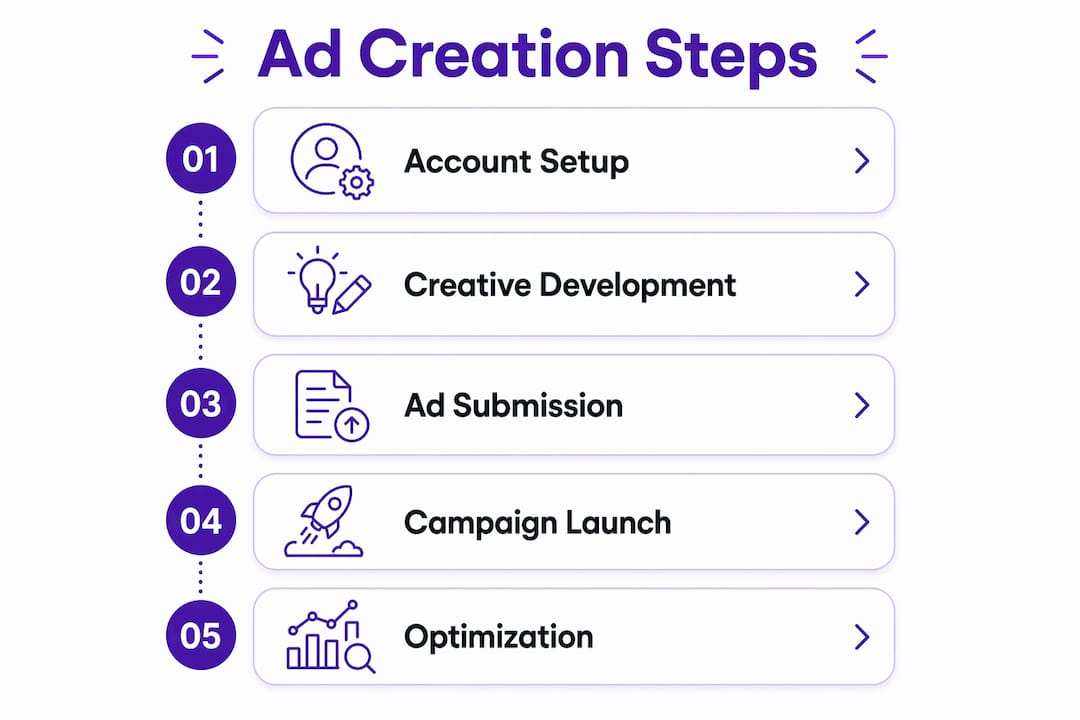
The actual campaign build follows a consistent sequence on both platforms, though the terminology and interface differ. Understanding the logical order prevents the common mistake of configuring creative before confirming that tracking is firing correctly.
The sequential campaign build process
-
Choose your campaign objective. On Meta, select App Promotion for mobile installs or re-engagement. On Google Ads, select App Campaigns, which automatically serve across Search, Play Store, YouTube, and Display. The objective determines which bidding strategies and optimisation signals are available downstream.
-
Define your audience and placements. On Meta, build a custom audience using interest stacking, lookalike audiences based on your highest-value players, or broad targeting with creative-led differentiation. On Google Ads, App Campaigns manage placements automatically, so your input is asset quality and bid strategy rather than manual placement selection.
-
Set your budget and bidding strategy. For new campaigns, start with a daily budget of at least 10 times your target cost per install to give the algorithm sufficient data to exit the learning phase. On Meta, Target Cost Per Result gives more predictable spend. On Google Ads, Target CPA or Target ROAS are the standard choices for UA campaigns with sufficient conversion history.
-
Upload your creative assets. Meta accepts images, single videos, carousels, and collection formats. Google App Campaigns accept up to 20 images, 20 headlines, five descriptions, and 20 video assets per campaign. Providing the maximum number of assets gives the algorithm more combinations to test.
-
Write and upload ad copy. Follow the hook, claim, proof, call to action structure for each text element. Keep headlines under 30 characters for Google to avoid truncation on smaller placements.
-
Submit and monitor review status. Most Meta ads are reviewed within 24 hours, but experienced practitioners plan for 36–48 hours to avoid delays around launch deadlines. Google Ads now offers Real-Time Policy Reviews, which provide instant policy feedback upon saving, allowing compliant ads to serve immediately.
Pro Tip: Schedule your Meta ad submissions at least 36–48 hours before any planned launch date. Review queues slow significantly around major gaming events, seasonal sales periods, and platform-wide policy updates. Building in this buffer costs nothing and prevents the scenario of a campaign going live hours after your intended window.
What are the best practices for ad creative in mobile game ads?
Creative is the primary performance lever in Meta campaigns. Audience targeting has narrowed as a differentiator since iOS 14 privacy changes reduced signal fidelity. The creative itself now carries most of the targeting weight by attracting the right users through relevance rather than demographic precision.
The most effective creative development process uses modular hook testing. Write at least five hook variations per concept and test them before committing to full production. A hook is the first two to three seconds of a video or the headline of a static ad. It determines whether a user stops scrolling. Testing hooks in isolation, before you invest in full creative production, identifies which emotional or functional angle resonates with your audience at the lowest possible cost.
The proven copy structure for mobile game ads is: hook → claim → proof → CTA. The hook creates attention. The claim states the core benefit. The proof provides a reason to believe, such as a rating, a player count, or a gameplay moment. The call to action directs the next behaviour. Testing this structure in a matrix format, such as four hook variants against two body copy versions, produces eight combinations from six pieces of content. That efficiency is what separates disciplined creative teams from those who produce one ad and wonder why it stops performing after two weeks.
- Isolate variables. Test one element at a time. Changing the hook and the body copy simultaneously makes it impossible to know which change drove the result. Isolating single variables in creative tests produces data you can act on with confidence.
- Align creative with the landing page. If your ad shows a puzzle mechanic, the App Store page should lead with that mechanic. Misalignment between ad and store page increases drop-off and reduces conversion rates after the click.
- Refresh creatives before fatigue sets in. On Meta, monitor frequency. Once average frequency exceeds three to four impressions per user, performance typically declines. Rotate new hooks into winning formats rather than rebuilding from scratch.
- Use gameplay footage as proof. For mobile games, authentic gameplay outperforms polished cinematic trailers in direct response contexts. Users want to see what they are actually downloading.
Pro Tip: Build your creative testing matrix in a spreadsheet before producing any assets. Map hook variants on one axis and body copy variants on the other. This forces clarity about what you are testing and prevents the common situation where teams produce assets without a clear hypothesis about what they expect to learn. You can find a detailed approach to this in Playablemaker’s guide to modular ad design.
How do you troubleshoot and optimise ads after launch?
Post-launch optimisation is where most UA budgets are either protected or wasted. The first 48–72 hours after launch are a data collection period, not a performance period. Resist the urge to make changes before the algorithm has sufficient signal.
The most common operational challenge on Meta is an ad stuck in review. Avoid duplicating ads for resubmission when this happens. Duplication creates a new review queue entry without resolving the underlying issue, and it can trigger additional scrutiny. Targeted edits to the specific element flagged produce faster re-reviews. Maintaining stable destination URLs also prevents unnecessary recrawls that extend review times.
On Google Ads, Real-Time Policy Reviews remove the traditional review bottleneck entirely for compliant assets. This means iteration cycles on Google are significantly faster than on Meta, which is an operational advantage worth building into your testing calendar.
Key troubleshooting principles for the post-launch phase:
- Do not scale before fundamentals work. The fastest way to waste budget is increasing spend before your creative and landing page conversion are proven. Confirm that your cost per install is within target at a modest daily budget before scaling.
- Monitor install-to-event rates, not just installs. A campaign delivering cheap installs from users who never reach day one is worse than a campaign with a higher cost per install from users who monetise.
- Set a review buffer for every campaign. Submit creatives 36–48 hours before launch as standard practice, not just for high-stakes campaigns.
- Pause underperforming creatives decisively. Letting a weak creative run because you spent time producing it is a sunk-cost error. The algorithm will deprioritise it anyway, but pausing it manually frees budget for assets that are working.
- Document every test. Record what you changed, when you changed it, and what the result was. Without documentation, teams repeat the same tests and draw different conclusions from similar data.
For a structured approach to integrating these steps into a wider UA workflow, the UA checklist for mobile gaming from Playablemaker provides a practical framework that maps creative testing to campaign phases.
Key takeaways
Effective step by step ad creation for mobile gaming requires correct platform setup, disciplined creative testing, and strategic launch timing to protect budget and maximise install quality.
| Point | Details |
|---|---|
| Set up tracking before campaigns | Install Meta Pixel and link GA4 to Google Ads before building any campaign. |
| Lock settings carefully | Time zone and currency cannot be changed on Meta or Google Ads after account creation. |
| Test hooks before full production | Write at least five hook variants and test them in isolation before committing to full creative builds. |
| Submit ads 36–48 hours early | Buffer against Meta review delays by scheduling submissions well before your launch deadline. |
| Scale only after fundamentals work | Confirm creative and landing page conversion at modest spend before increasing daily budgets. |
What i have learned from running this process at scale
By Ondrej
The part of this process that most teams underestimate is the relationship between measurement setup and creative iteration speed. When tracking is wired correctly from day one, you get clean conversion data within the first week of a campaign. When it is not, you spend two weeks debugging Events Manager or GA4 discrepancies instead of making creative decisions. I have seen UA teams lose an entire testing cycle because the Pixel was firing on page view instead of purchase. That is not a creative problem. It is a setup problem that masquerades as one.
The other thing I would push back on is the instinct to treat creative testing as a volume game. More variants do not automatically produce better results. What produces better results is a clear hypothesis for each variant and the discipline to test one variable at a time. A matrix of four hooks against two body versions gives you eight data points from six assets. That is efficient. Producing twenty assets with no systematic structure gives you noise.
The operational reality of review timelines is also underappreciated. Practitioners who build the 36–48 hour buffer into their standard process never panic about launch delays. Those who treat it as optional find themselves explaining to stakeholders why a campaign went live a day late. Build the buffer in as a non-negotiable step, not a contingency.
Finally, the dynamic ad creative process is not a one-time setup. It is a continuous cycle. The teams that win in mobile gaming UA are the ones who treat every campaign as a learning exercise, not just a delivery mechanism.
— Ondrej
How Playablemaker fits into your ad creation workflow
Once your Meta and Google Ads campaigns are structured and your creative testing process is running, the next question is format diversity. Playable ads consistently outperform static and video formats for mobile game user acquisition because they let users experience the game before downloading. Playablemaker’s no-code drag-and-drop builder lets you create interactive playable ads without developer resources or production budgets that erode your media spend. The psychology behind why this format converts is explained in detail in Playablemaker’s piece on why playable ads work. If you are already running a disciplined step by step ad creation process on Meta and Google, adding playable formats through Playablemaker is a logical and cost-effective next step.
FAQ
What is step by step ad creation for mobile gaming?
Step by step ad creation is a structured process covering platform setup, audience configuration, creative development, and post-launch optimisation. For mobile gaming UA, it integrates Meta Business Suite and Google Ads Expert Mode with modular creative testing to drive quality installs.
How long does meta ad review take?
Most Meta ads are reviewed within 24 hours, but practitioners plan for 36–48 hours to buffer against queue delays. Submitting creatives early and avoiding frequent edits reduces the risk of extended review times.
What is the best ad copy structure for mobile game ads?
The proven structure is hook, claim, proof, and call to action. Testing this across a matrix of hook and body copy variants, such as four hooks against two body versions, identifies winning combinations before full budget is committed.
Why does google ads require expert mode for UA campaigns?
Expert Mode unlocks granular bidding strategies, conversion-based campaign types, and audience controls that the simplified interface does not expose. For mobile gaming UA, these controls are necessary to optimise towards in-app events rather than surface metrics.
When should you scale a mobile gaming ad campaign?
Scale only after your creative and landing page conversion rates are proven at a modest daily budget. Increasing spend before fundamentals are confirmed accelerates budget loss rather than install growth.
Recommended
- Ad creation guide for UA teams in mobile gaming – playablemaker.com Ad creation guide for UA teams in mobile gaming
- How to Make Engaging Game Ads for Mobile Success – playablemaker.com How to Make Engaging Game Ads for Mobile Success
- Mobile ad formats for gaming UA: complete list 2026 – playablemaker.com Mobile ad formats for gaming UA: complete list 2026
- How to Repurpose Ad Creatives for Mobile Gaming Success – playablemaker.com How to Repurpose Ad Creatives for Mobile Gaming Success