
TL;DR:
- No-code advertising allows marketers to create, launch, and manage paid ad campaigns without using any code, leveraging AI-powered platforms and automation tools. Proper preparation, including defining a brand knowledge base and implementing safety rules, is essential before connecting AI to ad accounts, ensuring strategic control and cost efficiency. This approach offers faster production, higher variation volume, and improved scalability compared to traditional ad creation methods, primarily optimizing for revenue and continuous performance feedback.
No-code advertising is defined as the practice of creating, launching, and managing paid ad campaigns using AI-powered platforms and automation protocols, without writing a single line of code. This guide to no-code ads covers the full workflow: from setting up accounts and building a brand knowledge base, to generating AI-driven user-generated content (UGC) creatives with tools like GetShorts, connecting live ad accounts via Meta Ads MCP and Claude Code, and applying data-driven optimisation to improve user acquisition. Mobile app marketers who follow this no-code marketing guide can expect faster production cycles, lower creative costs, and more scalable testing across Meta and Google Ads.
What does a guide to no-code ads actually require before you start?
The most common mistake mobile marketers make is connecting their ad accounts to an AI tool before defining any rules or decision frameworks. The result is an autonomous agent with full access and no guardrails. Before you touch a single platform integration, three categories of preparation are non-negotiable.
Accounts and access you will need:
- A Meta Business Manager account with ad account access
- A Google Ads account with conversion tracking configured
- Subscriptions to AI creative tools such as GetShorts for UGC video generation
- Access to Claude Code or a compatible MCP-enabled environment for live account integration
- API tokens for Meta and Google Ads with the minimum required scopes
Security comes before speed. Start with read-only permissions for any AI agent connecting to your ad platforms. This lets you audit decisions and validate outputs before granting write access. Giving full permissions upfront is the single fastest way to generate unintended spend.
The third requirement is your brand knowledge base, often called a “brand brain.” This is a structured document, typically written in markdown, that contains your audience personas, tone of voice rules, creative constraints, and campaign objectives. Without a brand brain, AI agents cannot make contextually sound decisions about your campaigns. Think of it as the strategic brief your AI reads before every action it takes.

| Preparation Area | What to Include |
|---|---|
| Ad platform accounts | Meta Business Manager, Google Ads, conversion tracking |
| AI tool subscriptions | GetShorts, Claude Code, MCP-compatible environment |
| API access | Read-only tokens scoped to required permissions only |
| Brand knowledge base | Personas, tone rules, creative constraints, campaign goals |
| Safety rules file | Pause triggers, spend caps, scaling thresholds in markdown |
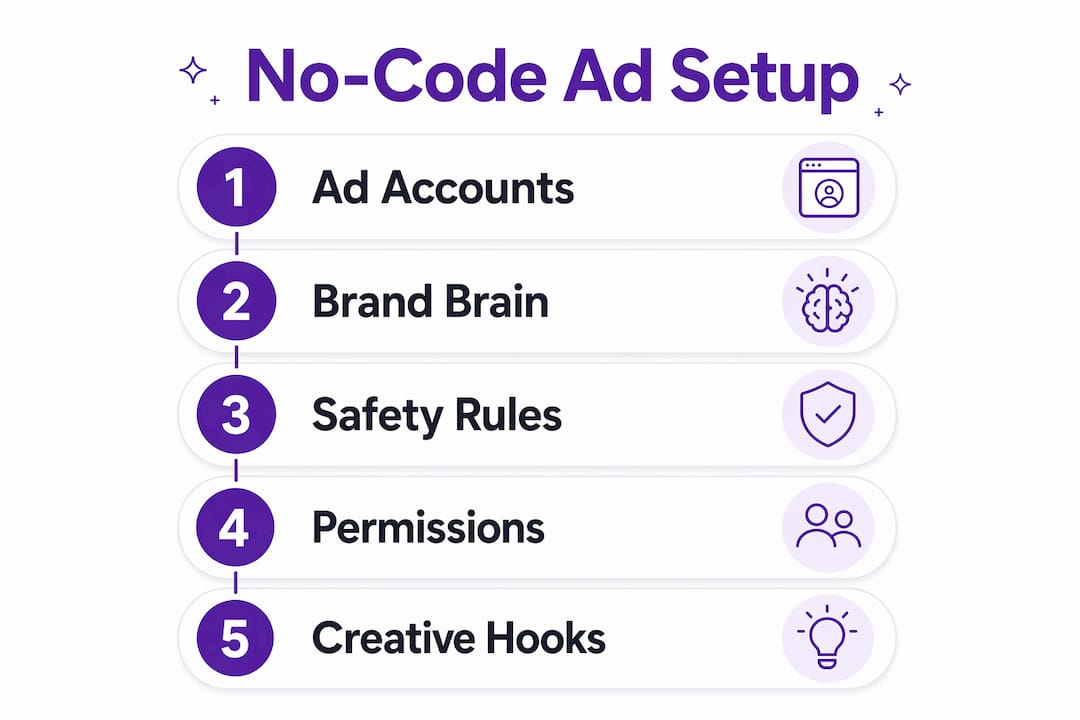
Pro Tip: Write your safety rules as explicit conditions in a markdown file before connecting any AI tool. Include spend caps, pause triggers, and scaling thresholds. This file becomes the operating manual your AI agent follows autonomously.
How do you create your first no-code ad campaign step by step?
The step-by-step no-code advertising process moves from product data to a live, paused campaign in well under an hour. Here is how the workflow operates in practice.
-
Extract product information. Paste your app’s store URL or landing page into GetShorts or a comparable AI creative generator. The tool extracts product features, benefits, and key selling points automatically.
-
Generate ad scripts and select avatars. The AI produces multiple script variations based on your product data. You then choose a digital avatar and voice that matches your target audience. Avatar selection matters more than most marketers expect. A poorly matched avatar reduces credibility and viewer retention, regardless of how strong the script is.
-
Render your UGC video creatives. GetShorts and similar platforms produce finished ad videos in under 15 minutes from URL to final file, with render times typically between 2–4 minutes. This is the core time advantage over traditional studio production.
-
Connect your ad account via Meta Ads MCP. Meta Ads MCP setup requires running 2–3 terminal commands and editing one JSON configuration file. The entire integration takes approximately 15 minutes. Claude Code then communicates directly with your live Meta account.
-
Generate batch variations. Rather than uploading a single creative, use Claude Code or your AI platform to produce 30 or more ad concepts from a single session. One documented workflow produced over 100 ad variations in a single run. This volume is what makes multivariate testing genuinely viable without a large creative team.
-
Publish in paused state and review. Campaigns built via MCP integration start in a paused state by default. This prevents unintended spend and gives you a clear checkpoint for human review before any budget is committed.
Pro Tip: Generate at least five distinct hooks per campaign in your first batch. Hooks are the first 3 seconds of your ad. Testing multiple hooks simultaneously gives your algorithm more data to work with from day one.
What optimisation strategies improve no-code ad performance?
Launching a campaign is the beginning, not the end. Sustained performance in mobile app user acquisition depends on a continuous feedback loop between data and creative generation. The AI creative strategy has evolved into exactly this: performance analysis feeding directly into the next round of creative production.
The most impactful shift you can make is moving your optimisation goal from lead volume to revenue. Feeding offline conversion data, including Google Click IDs (GCLIDs), back into your ad platforms allows Smart Bidding algorithms to optimise for actual profit rather than surface-level engagement metrics. This is particularly relevant for mobile app marketers tracking in-app purchases or subscription conversions.
Automation rules are the second lever. Structure your rules as explicit conditions in your brand knowledge base file:
- Pause triggers: Stop any ad set where cost per acquisition exceeds your target by more than 30% over a 72-hour window
- Scaling triggers: Increase budget by 20% for any ad set delivering cost per acquisition at least 15% below target for 48 consecutive hours
- Fatigue detection: Flag any creative where click-through rate drops more than 25% week on week and queue a replacement
“The most vital step in no-code ad automation is defining the brand brain to give AI agents strategic context. Without it, autonomous optimisation is directionless.” — Stratega Blog
A structured brand workspace can automate weekly performance audits and identify wasted spend across both Meta and Google Ads simultaneously. This removes the manual reporting burden and keeps your creative refresh cycle aligned with actual performance data rather than guesswork. You can read more about how data drives user acquisition in mobile advertising to deepen this approach.
What are the most common mistakes in no-code ad workflows?
The no-code advertising space is maturing quickly, but several recurring errors consistently undermine campaign performance. Recognising them before they occur saves both budget and time.
Connecting before defining. Attaching an AI agent to a live ad account without a completed brand knowledge base or safety rules file is the most costly error. The agent will act, but it will act without strategic context. Define your decision framework first.
Overpermissioning from the start. Granting full read and write access on day one removes your ability to catch errors before they become expensive. Read-only access during the audit phase is the correct sequence.
Weak hooks in AI-generated creatives. Ads that open with uneventful phrases lose viewer attention within the first two seconds. Instruct your AI tool explicitly to open with a tension statement, a surprising claim, or a direct question. Generic openers are the single most common reason strong scripts underperform.
Testing too few variations. Uploading one or two creatives and waiting for results is a slow and unreliable method. Batch testing multiple hooks and formats in a single session produces a broader testing suite and accelerates the learning phase of your campaign algorithm.
Ignoring creative fatigue. Mobile audiences see the same ads repeatedly. A creative that performs well in week one can deteriorate sharply by week three. Build fatigue detection into your automation rules and schedule proactive refreshes before performance drops, not after.
Pro Tip: When briefing your AI tool on avatar selection, specify the demographic, communication style, and emotional register you want. Vague briefs produce generic avatars. Specific briefs produce creatives that feel authentic to your audience.
How do no-code ads compare with traditional ad production?
The practical differences between no-code advertising workflows and traditional production methods are significant enough to change how mobile app teams structure their entire creative operation. The comparison below reflects real workflow differences rather than theoretical projections.
| Dimension | No-Code Ad Workflow | Traditional Production |
|---|---|---|
| Time to first ad | Under 15 minutes | Days to weeks |
| Batch production | 30–100+ variations per session | 3–5 per production cycle |
| Cost per creative | Subscription cost only | Studio fees, talent, editing |
| Iteration speed | Hours | Days |
| Scalability | Automated, data-driven | Manual, resource-dependent |
| Human oversight | Required at review stage | Required throughout |
The speed advantage is real, but it comes with a caveat. No-code workflows excel at volume and iteration. They are less suited to high-production brand campaigns where visual craft and bespoke storytelling are the primary differentiators. For mobile app user acquisition, where performance data determines creative direction, the no-code approach is the more rational choice. Exploring budget-friendly ad creation steps alongside these workflows gives you a complete picture of cost management at scale.
The scalability argument is particularly strong for mobile app marketers running multivariate tests across multiple audience segments. Traditional production cannot match the output volume required to feed a modern algorithm with sufficient creative data. No-code tools close that gap without requiring additional headcount. Understanding how AI shapes creative ideation in mobile campaigns adds further context to this shift.
Key takeaways
No-code ad creation is most effective when AI tools are paired with a structured brand knowledge base, explicit safety rules, and a continuous performance feedback loop.
| Point | Details |
|---|---|
| Define before connecting | Build your brand knowledge base and safety rules file before linking any AI tool to a live ad account. |
| Start with read-only access | Limit AI agent permissions to read-only during the audit phase to prevent unintended spend. |
| Batch creative production | Generate 30 or more ad variations per session to give your algorithm sufficient data for meaningful testing. |
| Optimise for revenue, not leads | Feed offline conversion data and GCLIDs into Smart Bidding to maximise actual campaign profit. |
| Automate fatigue detection | Build pause and refresh triggers into your automation rules to maintain creative performance over time. |
Why the brand brain is the real differentiator
I have spent considerable time working with AI-driven ad workflows, and the pattern I see most often is marketers focusing on the tools rather than the strategy behind them. Claude Code and Meta Ads MCP are genuinely impressive. GetShorts produces credible UGC creatives at a speed that would have seemed implausible three years ago. But the teams getting the best results are not the ones with the most sophisticated tool stack. They are the ones who invested time in building a thorough brand knowledge base before touching a single integration.
The brand brain concept sounds administrative. In practice, it is the difference between an AI agent that makes decisions you would endorse and one that optimises towards metrics you did not intend to prioritise. I have seen campaigns where the AI correctly identified a high-performing audience segment and scaled budget towards it, purely because the brand knowledge base contained a clear definition of the ideal customer profile. Without that document, the same agent would have optimised towards click volume.
The other observation worth sharing is that no-code advertising strategies do not eliminate the need for marketing judgement. They redistribute it. You spend less time on production and more time on defining the rules, reviewing outputs, and interpreting performance data. That is a better use of a senior marketer’s time. The tools handle execution. You handle strategy. That division is, in my view, the correct one.
— Ondrej
Build playable ads without code using Playablemaker
If this guide has demonstrated anything, it is that no-code ad creation is now a practical reality for mobile app marketing teams of any size. Playablemaker extends that capability into one of the most engaging ad formats available: playable ads. The platform’s drag-and-drop builder lets you create fully interactive ad experiences without involving your development team or commissioning expensive external studios. For mobile app marketers focused on user acquisition, playable ads deliver measurable engagement advantages by letting users experience your app before they install it. Playablemaker makes that possible at a fraction of the traditional cost and time investment.
FAQ
What is a no-code ad?
A no-code ad is a paid advertisement created using AI-powered platforms and automation tools, without writing any code. Marketers use tools like GetShorts, Claude Code, and Meta Ads MCP to produce, launch, and manage campaigns entirely through visual interfaces and structured workflows.
How long does it take to create a no-code ad?
AI-generated UGC ads can be produced in under 15 minutes from a product URL to a finished video file, with render times typically between 2–4 minutes. Full campaign setup via Meta Ads MCP takes approximately 15 additional minutes.
Do i need technical skills to use no-code ad tools?
No specialist coding skills are required. Meta Ads MCP setup involves running 2–3 terminal commands and editing one configuration file, which most marketers can complete without developer support.
What is a brand knowledge base in no-code advertising?
A brand knowledge base, or “brand brain,” is a structured markdown document containing audience personas, tone of voice rules, creative constraints, and campaign objectives. It gives AI agents the strategic context they need to make sound decisions autonomously.
How do no-code ads improve mobile app user acquisition?
No-code workflows allow marketers to generate large batches of ad variations quickly, enabling proper multivariate testing across audience segments. Combined with revenue-focused Smart Bidding and offline conversion data, this approach produces more efficient cost-per-install and in-app conversion outcomes.
Recommended
- How to Repurpose Ad Creatives for Mobile Gaming Success – playablemaker.com How to Repurpose Ad Creatives for Mobile Gaming Success
- Defining no-code development for engaging mobile game ads – playablemaker.com Defining no-code development for engaging mobile game ads
- Master Effective Playable Ad Techniques for Mobile Gaming – playablemaker.com Master Effective Playable Ad Techniques for Mobile Gaming
- Ad A/B Testing Guide for Higher Mobile Game ROI – playablemaker.com Ad A/B Testing Guide for Higher Mobile Game ROI