
TL;DR:
- Mobile ad SDKs are libraries that facilitate ad requests, display, and event tracking within apps.
- Proper SDK setup, including initialization and consent management, is vital for revenue and legal compliance.
- Choosing the correct SDK variant and maintaining continuous validation are essential for long-term monetization success.
Mobile app marketers and user acquisition specialists often treat “ad SDK” and “ad network” as interchangeable terms. They are not, and that confusion costs money. Choosing the wrong SDK variant, skipping initialisation steps, or ignoring mediation configuration can silently cripple your revenue and undermine entire UA campaigns before a single impression is served. Understanding exactly how mobile ad SDKs work is not a developer concern reserved for the engineering team. It is a marketer’s operational advantage.
Table of Contents
- What is a mobile ad SDK?
- How mobile ad SDKs drive user acquisition and revenue
- Key integration nuances: initialisation, consent, and compliance
- SDK variants and the importance of platform fit
- The hidden challenges and expert strategy for ad SDK success
- Take your mobile ad strategy further with no-code interactive creatives
- Frequently asked questions
Key Takeaways
| Point | Details |
|---|---|
| Mobile ad SDK essentials | A mobile ad SDK lets apps request and display ads from networks with minimal code changes. |
| Choose SDKs strategically | Matching the right SDK variant to your app and campaign goals is crucial for reach and revenue. |
| Stay compliant | Handle initialisation and consent correctly to ensure your monetisation is legal and robust. |
| Prioritise future readiness | Regularly validate and update SDKs for compatibility, mediation support, and deprecation issues. |
What is a mobile ad SDK?
Having set the context, let us break down what a mobile ad SDK actually is and how it empowers marketers behind the scenes.
A mobile ad SDK (Software Development Kit) is an app library integrated directly into an iOS or Android application. Its purpose is precise: once embedded, it enables the app to request, receive, and display advertisements. As Google’s documentation describes it, a mobile ad SDK is “an app library integrated into an iOS/Android app so it can request, receive, and display ads (after the SDK is initialised).”
Think of it as the infrastructure layer sitting between your game and an ad network. The SDK handles the low-level communication, ad rendering, and event tracking that marketers rely on for revenue. Without it, there is no bridge between your app and the advertisers willing to pay for placement.
Understanding ad monetisation in mobile gaming starts here. The SDK is what makes that monetisation technically possible, and its configuration determines whether you earn competitive eCPMs or leave money on the table.
Common ad formats supported by mobile ad SDKs:
- Banner ads: persistent, low-interruption placements at the top or bottom of the screen
- Interstitial ads: full-screen ads served at natural breakpoints, such as between game levels
- Rewarded ads: opt-in video ads where the user earns in-game currency or lives in exchange for watching
- Native ads: ads designed to match the visual style of the surrounding app content
- App open ads: displayed when a user opens or switches back to an app
Each format serves a different user experience goal, and the SDK must be configured to support the specific formats your monetisation strategy demands.
| SDK action | What it does | Why it matters to marketers |
|---|---|---|
| Initialisation | Loads the SDK at app startup | Required before any ad can be requested |
| Ad request | Sends a call to the ad network | Triggers the auction or waterfall process |
| Ad render | Displays the returned creative | Determines user-facing ad experience |
| Event tracking | Records impressions, clicks, completions | Powers your analytics and attribution data |
“The SDK is effectively the plumbing of mobile advertising. Marketers focus on campaigns, but the SDK determines whether those campaigns can even reach the user. A misconfigured SDK is a leaky pipe.” This perspective from experienced mobile ad engineers captures why digital advertising tools need to be understood at an operational level, not just delegated blindly to developers.
How mobile ad SDKs drive user acquisition and revenue
With the definition established, let us see how mobile ad SDKs translate into actual user acquisition strategies and real-world monetisation.
The most widely adopted pattern in mobile gaming, as Google’s mediation documentation confirms, is to “integrate one ads SDK plus optional mediation or bidding layers that decide which network’s ad to show.” This pattern is standard practice because it balances simplicity of integration with the competitive pressure needed to maximise revenue.
Here is how UA managers and monetisation specialists typically structure this in practice:
-
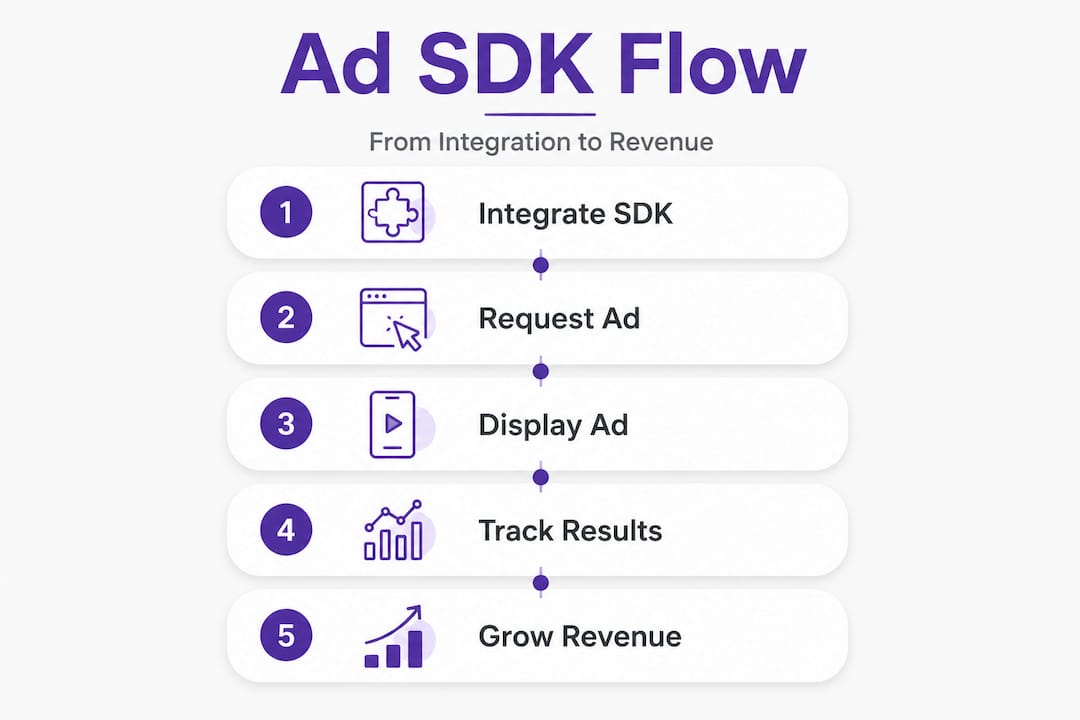
Integrate the primary ads SDK. This is the foundation. Your developers embed the chosen SDK (for example, Google Mobile Ads SDK) into the game’s codebase. This single integration unlocks access to the network’s demand and mediation infrastructure.
-
Initialise the SDK at app launch. The SDK must be initialised before any ad request is made. This step is non-negotiable and must happen early in the app’s startup sequence. Skipping or delaying this is one of the most common causes of failed ad delivery.
-
Select and configure ad formats. Based on your monetisation model, you configure which formats appear at which points in the user journey. For a mobile game, rewarded video at natural pause points tends to generate the highest engagement and revenue.
-
Add mediation or bidding adapters. Mediation allows your app to run an auction across multiple ad networks simultaneously, serving the highest-paying ad available at any moment. This step is where UA revenue can increase significantly, as competition between networks drives up eCPMs.
-
Monitor, test, and iterate. UA managers who treat SDK setup as a one-time task miss continuous optimisation opportunities. Adapter updates, network performance shifts, and format testing all require ongoing attention.
Understanding the evolution of mobile game monetisation shows why mediation has become so central. Early mobile games relied on single-network deals. Today, sophisticated UA teams run multiple networks through mediation to consistently serve the most competitive bid available.

When evaluating best ad platforms for UA, your SDK mediation setup determines whether you can actually access those platforms’ demand programmatically.
Pro Tip: Always verify which mediation adapters your chosen SDK version supports, and build an update schedule into your sprint planning. Adapters are deprecated regularly, and an outdated adapter can silently stop serving ads from a high-value network without triggering an obvious error. The revenue loss is real but often invisible until you audit your marketing performance data.
Key integration nuances: initialisation, consent, and compliance
Understanding mediation and ad delivery tactics is vital, but getting the technical and legal setup right is equally important. Here is what savvy marketers watch for.
Google’s own documentation on SDK initialisation makes this explicit: “A key engineering mechanics nuance is startup and initialisation and consent handling: you initialise the ads SDK early, and consent APIs may be set before requesting ads so policy compliance applies to ad delivery.”
This matters enormously for GDPR in Europe and CCPA in California. If consent is not collected and communicated to the SDK before an ad is requested, you risk serving non-compliant personalised ads to users who have not opted in. That is not a hypothetical risk. It is a regulatory and commercial liability.
Common mistakes in SDK setup that marketers should push back on:
- Initialising the SDK too late in the app lifecycle. If initialisation happens after the first screen loads, early ad opportunities are lost entirely.
- Missing the consent collection step. Many teams integrate consent management platforms separately and assume the SDK picks up consent signals automatically. It does not, unless explicitly configured.
- Not testing consent flows across each app update. Consent logic can break silently when app code changes, particularly around major OS updates or SDK version upgrades.
- Ignoring regional compliance differences. GDPR and CCPA have different consent signal requirements. A single consent flow cannot satisfy both without deliberate configuration.
- Assuming the SDK handles compliance for you. The SDK provides the tools. The configuration and testing responsibility sits with the team managing integration.
The range of types of in-game ads you are able to serve is directly constrained by how cleanly your consent and compliance configuration is set up. Personalised ad formats, which typically command the highest CPMs, require explicit user consent in regulated markets.
“Consent settings are not a formality. They are the legal and commercial foundation for ad delivery. An SDK without a properly configured consent layer is an SDK that cannot serve your highest-value ad inventory compliantly.” This is particularly critical when verifying flawless ad tracking across your measurement stack.
Pro Tip: Build consent flow testing into your QA checklist for every release cycle, not just major updates. A single overlooked consent signal can result in serving non-personalised ads at significantly lower CPMs across an entire user segment.
SDK variants and the importance of platform fit
After covering compliance and setup, it is critical to match SDK choice to your platform and business goals. Here is what you need to know about SDK variants.
Not all SDKs are identical in size or capability. Google’s AdMob documentation documents this directly: “Different mobile ad SDK variants exist to manage app size and method-count constraints, for example, Google Mobile Ads Lite SDK (deprecated as of January 2026) versus the full SDK. The Lite SDK reduces on-device size but has limitations depending on whether Google Play services are present.”
This is a practical reality for game studios managing app bundle sizes, particularly those targeting markets where device storage and processing power are constrained.
| Feature | Full SDK | Lite SDK (deprecated Jan 2026) |
|---|---|---|
| App size impact | Larger footprint | Smaller footprint |
| Google Play services required | Optional | Essential |
| Ad format support | Full range | Restricted |
| Long-term support | Active | Deprecated |
| Mediation support | Full | Limited |
| Recommended for new integrations | Yes | No |
Situations where using a Lite or reduced SDK variant is a poor choice:
- Your audience includes devices without Google Play services (common in certain Asian markets)
- You require full mediation adapter support across multiple networks
- Your game targets devices running older Android versions where Play services may be absent or outdated
- You are building a new integration after January 2026, when Lite SDK deprecation takes effect
- Your monetisation strategy depends on rewarded or interstitial formats that Lite SDKs do not reliably support
The market reach implication here is significant. If your target audience includes users in markets with high non-GMS (Google Mobile Services) device penetration, choosing a Lite SDK that depends on Play services can mean a meaningful percentage of your potential audience never sees an ad at all. Revenue simply does not arrive for those users.
Selecting the right ad creative tools is only effective if the SDK variant you have chosen can actually serve those creatives to your full audience.
The hidden challenges and expert strategy for ad SDK success
Now that you know the main types and nuances, let us look beyond the manual at what most marketers miss about long-term SDK success.
Conventional SDK integration guidance focuses on setup steps. Get the library in, initialise it, configure formats, and launch. That approach works for a single release cycle. It fails over time. The mobile advertising landscape moves quickly. SDKs are updated, mediation adapters are deprecated, consent requirements change with regulation, and platform rules evolve.
The practical danger is that revenue degradation from SDK issues is rarely sudden. It is gradual and quiet. An adapter stops serving because its waterfall support has ended. A consent configuration breaks silently on an OS update. A Lite SDK variant starts failing on devices where Play services is missing or outdated. Impressions decline, eCPMs dip, and by the time someone traces it back to the SDK layer, weeks of revenue have been lost.
The uncomfortable truth is that most UA and monetisation teams do not have a structured process for validating SDK health continuously. They validate at integration and then assume it keeps working. That assumption is the source of more silent revenue loss than most marketers realise.
Google’s own mediation documentation acknowledges that adapter support can change over time, with specific patterns ending for certain integration configurations. This is not an edge case. It is the expected lifecycle of mediation infrastructure.
Agile SDK strategy means building validation into regular workflows, not only at launch. That includes checking adapter compatibility with each SDK update, auditing consent configurations after OS releases, and monitoring impression and fill rate data as proxy signals for SDK health.
Staying current with SDK trends and updates gives you early warning on deprecations and platform changes before they affect live revenue. The marketers who catch these signals early maintain consistent monetisation. Those who do not discover the problem only after revenue has already declined.
Pro Tip: Set up automated monitoring for fill rate and impression volume per network and per ad format. Sudden drops in a specific network’s fill rate, without a corresponding campaign change, often indicate an SDK or adapter issue rather than a demand problem.
Take your mobile ad strategy further with no-code interactive creatives
Having mastered the fundamentals, you are ready to take practical action with tools built for marketing managers in mobile games.
Understanding how SDKs work gives you a significant operational advantage, but the creatives you serve through those SDKs are equally important. Playable and interactive ads consistently outperform static formats for user acquisition in mobile gaming, delivering higher engagement and better quality installs. The barrier has always been cost and production time. At PlayableMaker, we built a no-code ad creation platform specifically to remove that barrier. You do not need developer time or a large budget to produce high-quality interactive creatives. To understand why this format drives such strong results, explore our guide on playable ads explained and see how they fit into your existing SDK-powered campaigns.
Frequently asked questions
How does a mobile ad SDK actually display ads in my app?
Once integrated and initialised, the SDK lets your app request ads from a network and handles displaying them in the chosen format, whether banner, interstitial, or rewarded video.
What’s the risk of using a deprecated or Lite SDK?
A Lite SDK deprecated as of January 2026 may not serve ads reliably on devices where Google Play services is absent or outdated, resulting in lost revenue and gaps in campaign reach.
Can one SDK handle ads from multiple networks?
Yes. Mediation serves ads from multiple networks through a single integration, running an auction or waterfall process to serve the highest-value available ad at each opportunity.
Why do compliance and consent matter for SDKs?
Consent APIs configured before ad requests ensure your delivery meets GDPR, CCPA, and network policy requirements, protecting both your legal standing and your access to premium, personalised ad inventory.
Recommended
- What Two Main Ad Formats Can Be Used in Mobile Gaming? – playablemaker.com What Two Main Ad Formats Can Be Used in Mobile Gaming?
- Top mobile ad platforms for gaming user acquisition – playablemaker.com Top mobile ad platforms for gaming user acquisition
- 7 Best Examples of Mobile Game Ads and Why They Work – playablemaker.com 7 Best Examples of Mobile Game Ads and Why They Work